User Guide
Every Şarj Rehberim feature, step by step. Tap a heading to jump to that section; use Try it to open the feature straight away.
Did you know?
Built only for Şarj Rehberim. Tap whatever interests you to open the details.
Only on Şarj Rehberim
More than a charging map: a log that reads your receipts, a route that factors in hills and weather, a dispute summary, a battery report and more. All free, no account.
See the station and its surroundings before you goUse Street View to check the spot, its surroundings and whether you feel comfortable there, before you set off.
On the site and in the app
- The station page and the map's directions window have Street View and Satellite View buttons; one tap and you're standing in front of the station.
- Going at night or on your own? Check beforehand whether the place looks well lit, busy and safe; if it doesn't feel right, pick another station on the map.
- Plan what to do while you charge: the station page lists the nearby café, restaurant, shop and toilets, so you can leave the car charging and walk over.
- See the entrance, the car park and exactly where the charger is; if it's right, get directions with Google, Apple or Yandex. The view opens in Google Maps; where Google's car hasn't been, the nearest user panorama may appear.
Your receipt is read automaticallyAdd a photo of your charging receipt; kWh, amount and date are read from it.
On the site and in the app
- When adding an entry in the Charging Log, choose or take a receipt photo; the kWh, amount and date fields fill in automatically.
- Reading happens on your device (in your browser on the site); the receipt is never sent to any server.
- My Receipts keeps all your receipts together: zoom in, share, or download each month as one ZIP.
- Receipts are added at the end of the Monthly Report; if you like, they also go into the backup file and move between the site and the app.
A one-page dispute summary for overchargesOvercharged, hit with an idle fee or charged without getting any energy? A dispute summary is prepared from your log entry.
On the site and in the app
- Tap the entry in the log and open the Dispute Summary: the price you paid is compared with that station's listed tariff.
- If you entered the start and end battery percentages, the kWh your car's battery should have taken is calculated and compared with the kWh on the receipt.
- The summary puts the receipt, date, station, difference and how to complain (first the network's customer service, then EPDK) on one page; print it or save it as PDF.
- You can read which fees are prohibited in the Your Charging Rights guide (EPDK 2026).
A route that accounts for hills, weather and speedThe charging plan factors in elevation, air temperature and road speed, so your arrival percentage comes out close to reality.
On the site and in the app
- Energy spent climbing and recovered going downhill is calculated (e.g. Antalya–Konya).
- A weather forecast along the route is taken for your departure time (MET Norway); cold and motorway speeds increase consumption, and the plan changes accordingly.
- If temperatures below 10 °C are expected at a stop, you're reminded to precondition your battery and shown how much longer charging could take if you don't.
- Routes are calculated on the Turkish road network on our own server; no outside service, free and unlimited.
Rest areas facing the other way aren't suggestedDriving to Ankara, you won't be sent to a charger at an "İstanbul-bound" rest area.
On the site and in the app
- The route plan checks which direction motorway rest areas serve (from the direction in their name or which side of the road they're on).
- So stops on the opposite carriageway, which you couldn't actually reach, don't end up in your plan.
- With Prefer Stops with Facilities, chargers at rest areas, shopping centres or fuel stations are preferred.
Battery health and a shareable report cardYour battery's real capacity is calculated from the charges in your log; share it as a report card when selling second-hand.
On the site and in the app
- As you enter start and end percentages in the Charging Log, your battery's real capacity is calculated; My Cars shows how it changes over time.
- Share this with a single link via Battery Report: capacity, number of measurements and charging habits open as a report card.
- When buying or selling a used car, it gives the buyer a concrete document.
- Nickname, plate and location are not included in the link.
Ask about your trip in your own wordsType "I'm driving to Bodrum tomorrow morning, where should I charge?"; stops, time and cost are calculated.
On the site and in the app
- The Charging Assistant understands your sentence and does the maths with our own route engine: stops, charging time, cost and departure time.
- You can also ask for the nearest or cheapest station, a network's price or your car's charging time.
- Open Plan opens the suggested plan on the route screen with the same stops and the same cost.
Every network's rules on one cardIdle (blocking) fee, reservations, payment methods, roaming and customer service in one place.
On the site and in the app
- Does an idle fee start when charging ends, how many minutes' grace is there, do reservations cost extra: one card for each network.
- How to start a charge, how to pay (app, card, QR), and which other networks accept the network's card.
- Customer service and current offers are on the same card; information is compiled only from the network's official pages.
- Station pages show the card for that station's network.
3D map: mountains and buildingsTilt the map with the 3D button; on the site mountains rise up, and buildings appear as you zoom in.
On the site and in the app
- Tap the 3D button on the right of the map; the map tilts, and tapping again returns it to the flat, north-up view.
- On the site, terrain relief and shading appear at regional scale: see the road up Uludağ or into the Kaçkar Mountains with its real gradient.
- At street scale buildings rise, so you can easily tell which building the station is in front of.
- The app has tilt and 3D buildings; terrain relief isn't in the app's map engine yet. When it's off, no extra data is downloaded.
"How is it now?" from other driversAt a station, say Busy, Available, Broken, Queue or Worked, so other drivers see it on the map.
On the site and in the app
- Stations reported available or busy in the last hour are coloured on the map; the list shows "Driver: Available · 12 min".
- Station pages show notes from the last 3 hours, the last successful charge and, once enough notes build up, the hours when it's "usually busy".
- Access questions: is it open to the public, is it 24/7, is parking paid; drivers' answers from the last 6 months.
- No sign-in, no ID: all reports are anonymous. You can also report in one tap from CarPlay and Android Auto.
Don't drive to a station you can't get intoStations in residential complexes, hotels or fleets show a "restricted access" warning at the top of the page.
On the site and in the app
- Stations that aren't open to the public are marked, so you know before you set off whether you can get in.
- Stations whose coordinates pointed to a province or district centre were moved to their real place or marked "approximate location".
- If a location is wrong, mark the real spot on the map on the station page; it's checked and corrected.
A warning before the idle fee startsOn networks that charge an idle fee, a countdown shows how many minutes you have before the fee starts.
In the app
- When your charge finishes, the network's grace period starts counting down.
- The time left appears in the notification, on the lock screen and in the widget, so you can move your car before the fee starts.
- Each network's idle fee is listed on its network card.
Never miss a price rise at stations you charge atWhen the DC tariff changes at stations in your log, the old and new prices are shown side by side.
On the site and in the app
- If the price changes at a station you've charged at, a card appears in the Charging Log: old and new price.
- The average ₺/kWh you paid this month is compared with the DC median of the same provinces: "you paid ≈ X ₺ more/less".
- What You Paid by Network: your average rate on each network over the last 6 months, next to the Türkiye median.
- In the route plan, you get a one-tap suggestion to prefer the network you charge at most.
Reports ready for expense claimsMonthly PDF report, trip report and annual accounting pack: ready for a company car.
On the site and in the app
- Monthly Report: a 6-month chart, split by network, car comparison (₺/100 km) and receipts; print it or save it as PDF.
- Trip report: a finished trip's stops, km, kWh and cost (actual amount from your log ✓, estimate ≈) on one page.
- Annual accounting pack: the year's entries and month-by-month summary (CSV), each month's report and the receipts in one ZIP.
- Fleet Charging Report: combine your drivers' log files into one report; the files stay in your browser.
Türkiye EV Charging Price IndexCharging networks' kWh prices month by month: who raised prices, the average, AC and DC separately.
On the site
- Calculated each month from tariffs verified on the networks' official websites; AC and DC averages are separate, and DC is also weighted by number of points.
- Price history network by network: how much it changed in which month.
- Download the data as CSV; use it in news stories or reports, crediting the source.
- Sign up for the newsletter to hear when each new month's index is published.
Recalculate if the plan changes on the roadIf a stop is busy, switch to a backup; if your battery differs from the plan, recalculate the rest of the route from that stop.
On the site and in the app
- If your next stop was reported busy or out of order in the last hour, the card shows a warning and opens backup stops within 40 km.
- If your battery at a stop differs from the plan, pick its percentage; the rest of the route is re-planned from there.
- At the end of the trip, enter your arrival percentage: plan and reality are compared, and your car's consumption is measured from your last 5 trips.
Add your charging stops to your calendarDeparture, every charging stop and arrival, with reminders, in your calendar in one tap.
On the site and in the app
- Tap Add to Calendar on the route result: each stop becomes a separate event with its arrival time, charging time and location.
- You get a reminder 15 minutes before each stop.
- The iPhone app adds them straight to your calendar; on other devices they're added with a calendar file.
A charging plan that avoids toll roadsA route that skips motorway, bridge and tunnel tolls where possible; the normal route shows how many km are tolled.
On the site and in the app
- Turn on Avoid Toll Roads in the route plan; charging stops are re-chosen for the toll-free route.
- The normal route also shows how many of its kilometres are tolled; the choice is yours.
- This setting is saved with the route in Saved Routes.
Cheapest time to charge at homeBased on your electricity tariff and home charging power: whether plugging in now or at night is cheaper, and how much it costs.
On the site and in the app
- Choose your single-rate or three-rate EPDK tariff and your home charging power; the cost of plugging in now and at night is calculated side by side.
- In the app you can set a reminder for when to plug in.
- The Electric or Petrol? calculator uses the same EPDK tariff: yearly and per-100-km cost side by side.
CarPlay, Android Auto and SiriNearby fast charging, favourites and your trip's next stop on your car's screen.
In the app
- CarPlay and Android Auto have a map, a big-button charger finder and, at every station, the 10%→80% time and cost for your car.
- Fast chargers in the area you scroll the map to are shown; directions in one tap.
- Say "Nearest fast charger in Şarj Rehberim" to Siri; get directions to a favourite or log a charge by voice.
- Use Report on the station screen to mark it available or busy from the car in one tap.
No account, your data stays with youYour cars, log, receipts and routes live only on your device; they move with a single file.
On the site and in the app
- You can use every feature without signing up; no email, phone number or password is asked for.
- Download Backup puts your cars, log, favourites, saved routes and, if you like, receipts in one file.
- With the same file you can move from the site to the app or to a new phone; your settings and followed provinces are kept.
A guide in 6 languages for drivers visiting TürkiyeFor drivers arriving as tourists or in a rental car: which app, how to pay, charging without an account.
On the site
- Turkish, English, German, Russian, Arabic and Persian: connector compatibility, charging options without an account, app sign-up, prices.
- The whole site is in 6 languages too; Arabic and Persian read right to left.
- Counter and in-car QR posters for car rental companies can be downloaded free in 6 languages.
1/22
Route Planner
Works out where and how long to charge on a long trip.
- 1On the Route page, type your start and destination and pick them from the list; add a waypoint if you like.
- 2Choose your car, then set your starting battery and the battery you want left on arrival.
- 3Tap Suggest Route: you get the charging stops, the kilometre for each, charging time and battery on arrival.
- 4Open the route with all its stops in Google Maps, or send it with Share Plan; whoever opens the link sees the same plan on the site or in the app.
- 5Choose a departure time (now, in 1–3 hours, tomorrow morning); the forecast is taken for that time, and you see the arrival time including charging and the total cost.
- 6Compare the Fast, Balanced and Fewer Stops modes side by side for the same route: number of stops, total time, arrival percentage and cost.
- 7Tailor the plan with Avoid Toll Roads and Prefer Stops with Facilities; the plan won't suggest motorway rest areas facing the other way.
- 8Each stop shows amenities such as toilets, café, restaurant and shop, plus drivers' notes from the last 3 hours.
- 9Put the stops in your calendar with Add to Calendar; add a route you drive often to Saved Routes, with its settings, using Save Route.
Stops are chosen from DC stations that fit your car's socket; pick your car in My Cars.
Try it2/22
Trip Mode
Your next charging stop, arrival time and directions in one tap; finished trips in My Trips.
- 1Tap Start Trip on the Suggest Route result.
- 2The next-stop card shows its kilometre, charging time and estimated arrival; open your map with Directions and send the arrival time with Arrival ≈ time · Share.
- 3If the stop was reported full or faulty, switch to the backup; time your charge with I've Started Charging, tap Next Stop when done and End Trip when you arrive.
- 4My Trips lists finished trips with stops, charging cost and savings versus petrol; PDF report and image sharing.
- 5With Started Charging, the time left to 80% counts down; in the app you get a notification when it's up, and on iPhone it shows on the lock screen and in the Dynamic Island.
- 6If your battery at a stop differs from the plan, pick its percentage so the rest of the route is recalculated; open the remaining stops in Google Maps in one go.
- 7As you approach a cold stop, the app reminds you to precondition your battery 25 minutes before arrival.
- 8At the end of the trip, enter your arrival percentage: your car's measured consumption is updated; add the stops to your log in one tap and share the trip as an image card.
No background location is used; you move through the stops yourself. Trips stay on your device and move with the backup file.
Try it3/22
Charging Assistant
Write your route and your question in your own words; the maths is done with our own route engine.
- 1Open the Charging Assistant from the menu.
- 2Type your question: "I'm driving from Izmir to Ankara tomorrow morning, where should I charge?", "Cheapest fast charging in Kadıköy?", "How much is a kWh at ZES?"
- 3The answer shows stops, time, cost and departure time; go to the route screen with Open Plan, and set off with Start Trip.
Your active car is taken from My Cars; to ask about a different car, include the model in your sentence.
Try it4/22
My Cars and Fleet
110+ models or your own car; charging time and cost at every station.
- 1In My Cars tap Add Car; pick from the list or, if it isn't there, enter battery, consumption and sockets with My Own Car.
- 2Add as many cars as you like with a nickname and plate. Choose the one used in calculations with Set as Active.
- 3Station pages show the 10–80% charging time and estimated cost for your active car, with your other cars compared below.
- 4On the map, use the Fits My Car chip to show only points that match your car's socket.
- 5The list has 470 electric models; your active car is used in the route plan, on station pages and in cost calculations.
- 6Consumption measured from your trips and battery health calculated from your log appear on your car's card; share them with Battery Report.
5/22
Car Comparison
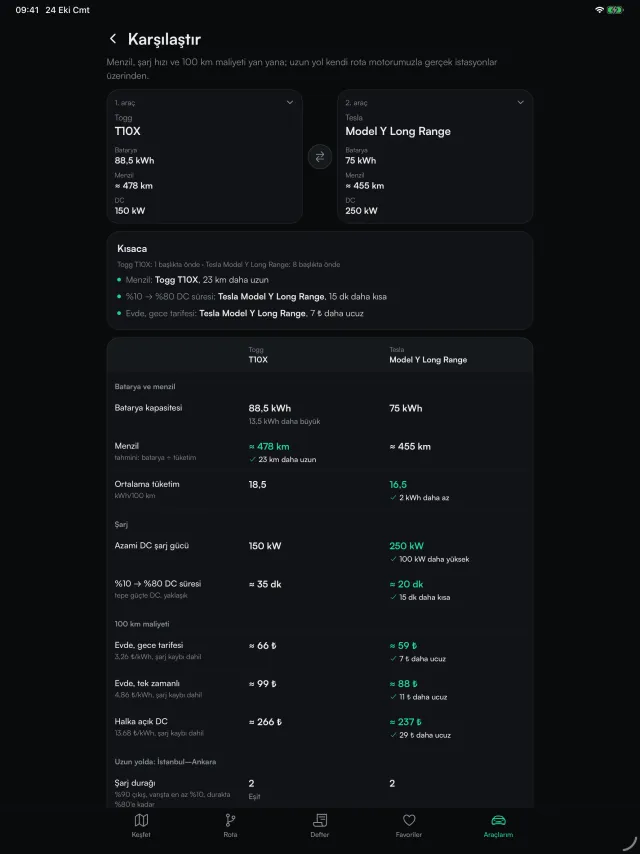
Put two of 470 electric models side by side: range, charging time, cost.
- 1On the Compare Cars page pick two models; just type "mercedes cla" or "id7".
- 2Range, 10%→80% charging time and cost per 100 km at home and on public DC appear side by side.
- 3Compare how many stops and how many lira each one takes on the Istanbul–Ankara route.
6/22
Cheapest Fast Charging
Sorts fast chargers with known prices from cheapest up.
- 1On the map, use your location or pick a province.
- 2Tap Cheapest Fast Charging above the list: with your location, points within 25 km are sorted by price; with a province, the points in that province.
7/22
Cost Calculators
Charging cost, the cheapest time to charge at home and the yearly cost of electric vs petrol.
- 1On the Prices page pick your car: the cost from 10% to 80% on AC and DC and the cost per 100 km are calculated.
- 2In the Electric or Petrol? guide, enter yearly km, your home charging share and the petrol price; see the yearly and per-100-km cost side by side.
- 3In the Cheapest Time to Charge at Home guide, find out whether to plug in now or at night based on your tariff.
- 4Home electricity is calculated from the EPDK tariff, public charging from the networks' current average.
8/22
Charging Networks, Prices and Offers
Each network's rules, current tariffs, the price index and verified offers.
- 1Tap a network in Charging Networks: number of stations, AC and DC prices and the network card (idle fee, reservations, payment methods, roaming, customer service).
- 2Follow networks' prices month by month in the EV Charging Price Index and download them as CSV.
- 3Charging Offers lists bank card and charging network offers: only those verified on the official page, removed automatically when they expire.
- 4Tariffs are regularly re-checked against the networks' official websites; if a price is wrong, report it from the station page.
9/22
Charging Log and Savings
Log your charges and see monthly costs and savings versus petrol.
- 1Tap Charged Here on a station page or Add Charge in the Charging Log; the cost is calculated from kWh and unit price.
- 2The log shows this month's total, energy, number of charges and average ₺/kWh; you can filter by car.
- 3The green line shows your savings versus a petrol car; tap it to update the petrol price.
- 4Export your entries to Excel with CSV, or get a printable Monthly Report for expense claims (it can be saved as PDF too); receipt screenshots you attach are added at the end.
- 5Add a receipt photo; kWh, amount and date are read on your device. See them all in My Receipts and download each month as a ZIP.
- 6Search entries by station, network, car or note; with Repeat, add a new entry with the same station and price in one tap. A deleted entry comes back with Undo for a few seconds.
- 7Set a monthly budget: you're warned at 80% and when you go over; you can give each car its own budget.
- 8If you enter the charging time, the average power is calculated; share it anonymously if you like, so the speed measured by drivers appears on the station page.
- 9If the price you paid differs from the listed tariff, a warning appears; report the price difference or prepare a Dispute Summary in one tap.
- 10See the year's number of charges, kWh, spending and savings in the Yearly Charging Summary; download the accounting pack as one ZIP.
10/22
Your Rights and Disputes
Overcharged, hit with an idle fee or at a station that didn't work: know your rights and complain with evidence.
- 1Read the EPDK 2026 rules in the Your Charging Rights guide: price display, prohibited extra fees, the 85% rule, 24/7 support.
- 2Tap the relevant entry in the Charging Log and open the Dispute Summary; the tariff comparison and kWh check are ready.
- 3Print the summary or save it as PDF; contact the network's customer service first, and EPDK if it isn't resolved.
11/22
Chargers Near Me
The closest stations to you, with distance.
- 1On the map, tap Use My Location.
- 2The map zooms to you and the list is sorted from nearest to farthest.
Your location is only used when you ask and is never stored.
Try it12/22
Search and Filters
Search by province, district, network or station name; filter by speed, power and price.
- 1Type a province, district, charging network (ZES, Trugo…) or station name in the search box at the top.
- 2Narrow the list and map with the Fast DC, 150+ kW, Known Price, 24/7 and Fits My Car chips.
- 3After choosing a province, pick a district from the strip; the numbers show the points in each district.
13/22
Station Details
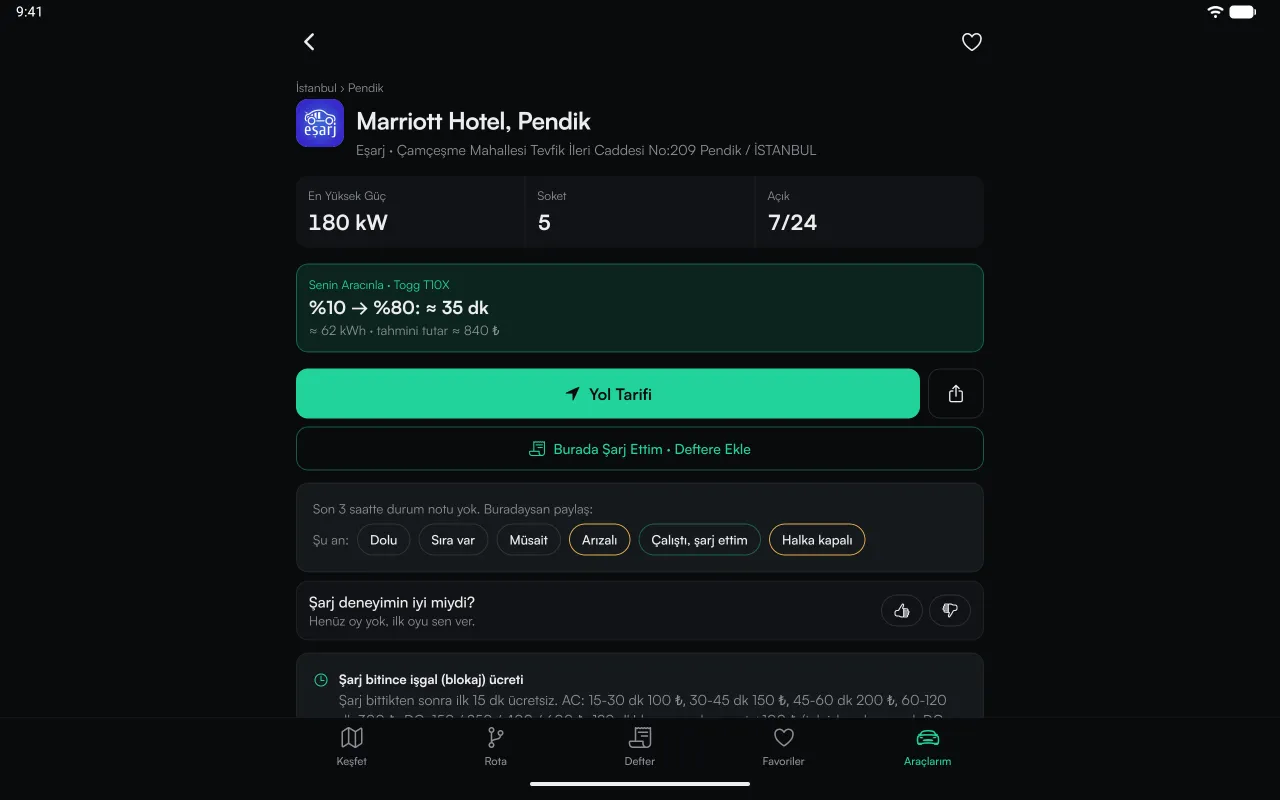
Sockets, power, price, opening hours, directions and problem reports.
- 1Tap a station on the map or in the list and open its page for details.
- 2Get directions with Google, Apple or Yandex; the heart adds it to your favourites.
- 3If something is wrong, tell us with the form at the bottom of the page.
- 4Connectors card by card: type, power, how many there are and, if live data is available, whether they're free right now; the connector that fits your car stands out.
- 5See the location with Street View or Satellite View before you set off; if it's right, get directions.
- 6Where it's located (rest area, shopping centre, fuel station) and nearby toilets, café, restaurant, shop and car park.
- 7Leave a "How is it now?" note (Busy, Available, Broken, Worked, Not public); answer the access questions. All anonymous.
- 8If you've charged here, you see your last charge from the log, the ₺/kWh you paid and how the tariff has changed since that day.
- 9If the location is wrong, mark the real spot on the map; stations with restricted access show a warning at the top of the page.
14/22
Full-Screen Map and Compass
Expand the map to full screen and, if you like, see your heading and coordinates.
- 1Use the expand button in the corner of the map for full screen; the same button or Esc exits.
- 2The compass button shows the direction your phone is facing (e.g. Southwest · 225°) and, with your location, latitude/longitude; a north button appears when the map is rotated.
- 3Tilt the map with the 3D button: on the site mountains rise up and buildings appear as you zoom in; tap again to return to the flat view.
- 4Density map at country level, clusters and points as you zoom in; stations that drivers reported available or busy in the last hour are coloured.
- 5Narrow down the map with AC, DC and amenity (toilet, café, shop…) filters.
On iPhone you need to tap Show Heading once and allow access for the direction.
Try it15/22
6 Languages, Light and Dark Theme
Turkish, English, German, Russian, Arabic, Persian; dark at night, light by day. Your choice is remembered.
- 1Pick your language from the menu; the same page opens in that language. Arabic and Persian display right to left.
- 2Tap the sun/moon button in the corner of the map or the Appearance section in My Cars.
16/22
Back Up and Move
Your cars, log and favourites in one file; phone ↔ website.
- 1In My Cars tap Download Backup; the file is saved to your device.
- 2In another browser or in the Şarj Rehberim app, choose the file with Restore from Backup.
17/22
Favourites
The points you use most, in one list.
- 1Tap the heart on a station.
- 2See them all on the Favourites tab; on the map, the Favourites chip shows only them.
18/22
Mobile App
Home screen widget, trip card on the lock screen; new point and price alerts on Android.
- 1For iPhone and Android; live on the App Store and Google Play, links in this section.
- 2The home screen widget shows the nearest and cheapest fast charging without opening the app.
- 3On Android you get a notification when a new point opens in a province you follow or when the price changes at a favourite station; these alerts aren't available on iPhone yet.
- 4In trip mode your next charging stop stays in the widget and the notification (a Live Activity on the iPhone lock screen); directions in one tap.
- 5On iPhone, lock screen widgets and Live Activity, with the next stop in the Dynamic Island; the Car Budget widget shows each car's spending this month.
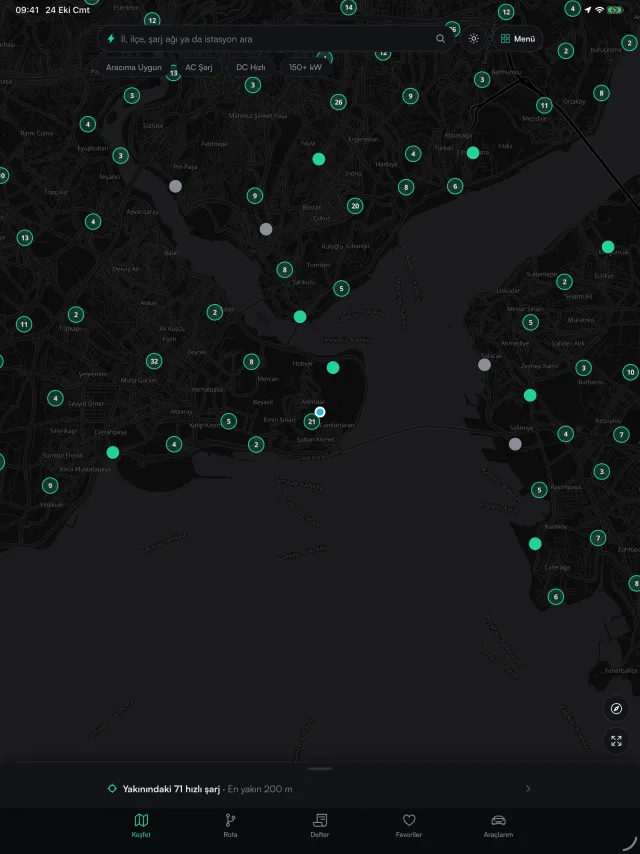
- 6Full screen on iPad, Android tablets, foldable phones and Macs with Apple silicon; the car screen on CarPlay and Android Auto.
- 7Offline trips: when a trip starts, details of the stops and backup stations are saved to your device, so they still open if you lose coverage.
With a backup file you can move your cars and log from the website to the app.
On tablets and Mac too
The app runs full screen on iPad and Android tablets: the map uses the whole width, lists and station pages sit in a comfortable centred column. The same App Store and Google Play link gives you the tablet version. On Macs with Apple silicon (M1 and later) the same app installs from the Mac App Store.
19/22
Car Screen: CarPlay, Android Auto, Siri
Connect your phone to your car; Şarj Rehberim opens on your car's screen.
- 1Connect your iPhone to CarPlay or your Android phone to Android Auto; the Şarj Rehberim icon appears on the car's screen.
- 2Fast chargers around you on the map, nearby chargers and favourites in Find Charging; filters for 150 kW+ and stations that fit your car.
- 3Tap a station: 10%→80% time and cost for your car; start navigation with Directions, and mark it available or busy with Report.
- 4In trip mode, the next stop stays on the car screen too. On iPhone, say "Nearest fast charger in Şarj Rehberim" to Siri.
The car screen comes with the app; it isn't on the site. Install the app from the App Store or Google Play.
Try it20/22
Guides, Routes and Reports
Charging time, connector types, winter range, AC vs DC, the tourist guide and ready-made route pages.
- 1Guides covers calculating charging time, connector types, home charging, winter range, long-distance planning, how to use a charging station, AC vs DC and a guide for tourists.
- 2Intercity Routes has ready-made charging plans, stops and a return-trip note for routes such as Istanbul–Ankara.
- 3The Türkiye Charging Report has infrastructure figures by province, district and network; province and district pages have an analysis of that place.
- 4What's New lists every update to the site and app, with dates.
21/22
For Businesses
Fleet report, car rental kit, adding a map to your website and getting a charger installed.
- 1Fleet Charging Report: combine your drivers' log CSVs into one report; monthly cost, kWh and network split by driver and car, as PDF and CSV.
- 2For Car Rental Companies: A4 counter and in-car posters in 6 languages; the QR code takes your customer to the charging guide in their language.
- 3Embed on Your Site: place the charging map or a station list on your own website.
- 4Install a Charger: send a request to have a charging station installed at your home, residential complex, hotel or business.
22/22
No Account, No Tracking
Your cars, log and favourites stay only on your device.
- 1No account needed; everything is stored in this browser.
- 2Visit statistics and advertising cookies are only used if you allow them; details are in the Privacy and Cookie policies.